Asset Register Deep Dive
How the register works underneath: asset statuses, what updates automatically and what waits for review, how a visit plan splits a large site across the year, how coverage is worked out, the pre-loading rules, QR tags, and bulk import including panel exports.
Last updated: 26 September 2026
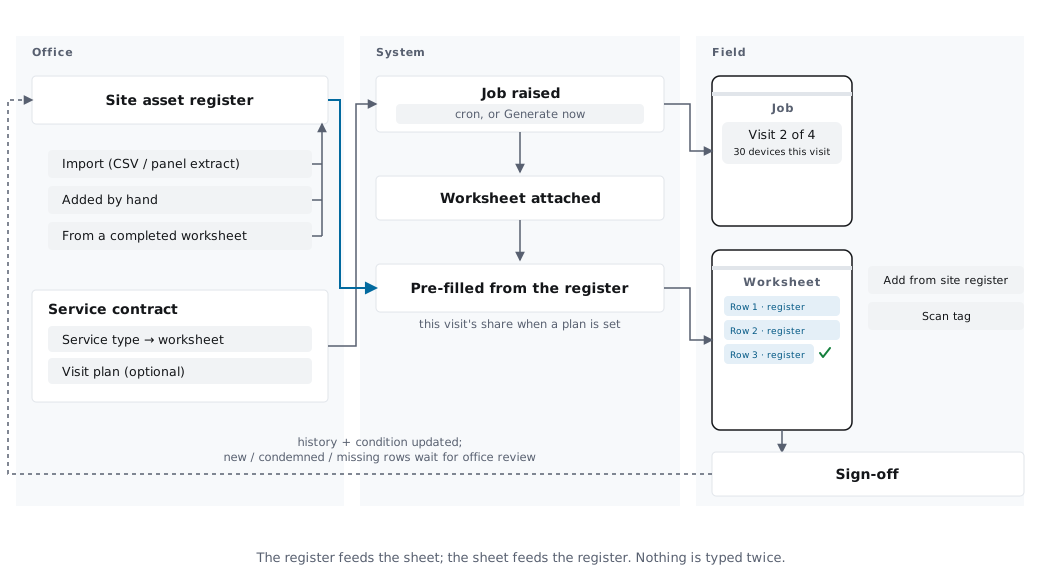
The 30-second version: the Asset Register tracks your customers' equipment - fire extinguishers, alarm panels and devices, emergency lighting, fire doors, electrical boards, EV chargers and more - across its whole life. Engineers keep it up to date by filling in their service worksheet or scanning a QR tag: routine updates apply automatically, and anything consequential (new equipment, condemned or missing items) waits for office review. Registered assets pre-load into worksheets on every job at the site, and on a large site a visit plan shares them out across the year.
Availability
The whole asset module is included on the Business plan - the register, pre-loading, the visit plan, coverage, QR/NFC tags, the per-site register PDF and bulk import. Starter and Team plans don't include any of it.
Why Track Assets in Opscel
- •Register updates come from the work itself - no separate data entry after the job
- •Office review of every consequential change, so the register stays trustworthy
- •QR tags identify equipment instantly on site, even offline
- •Service continuity: assets pre-load into worksheets on every return visit, and a visit plan keeps big sites manageable
- •Coverage is visible: which assets are on a contract, and which are not
- •Compliance via certificate and job links, plus a per-site Asset Register PDF
For the step-by-step office tasks and what the engineer sees on the phone, start with the Asset Tracking support guide. This page is the model underneath it.
Need More Help?
If you're stuck or need assistance, our support team is here to help.