Job Management That Actually Makes Sense
Create jobs, assign engineers, track progress, mark complete. Everything in one place, nothing falls through the cracks. No spreadsheets, no whiteboards, no "where's that job sheet?" panic.
How it works
Who it's for
- 3-step wizard creates jobs in under 2 minutes
- Quick edit modals for schedule changes—no full reload
- Multi-site contact selection prevents wrong recipient errors
- Work summary visible before completion—no status calls
- Parts tracking shows material costs per job
- Job types auto-select correct certificate templates
- See all job details on mobile—customer, address, notes
- Multi-visit tracking shows what was done on previous visits
- Parts catalog on phone—add materials used on-site
- Work summary dictation—speak notes instead of typing
- Auto duration calculation from GPS check-in/out
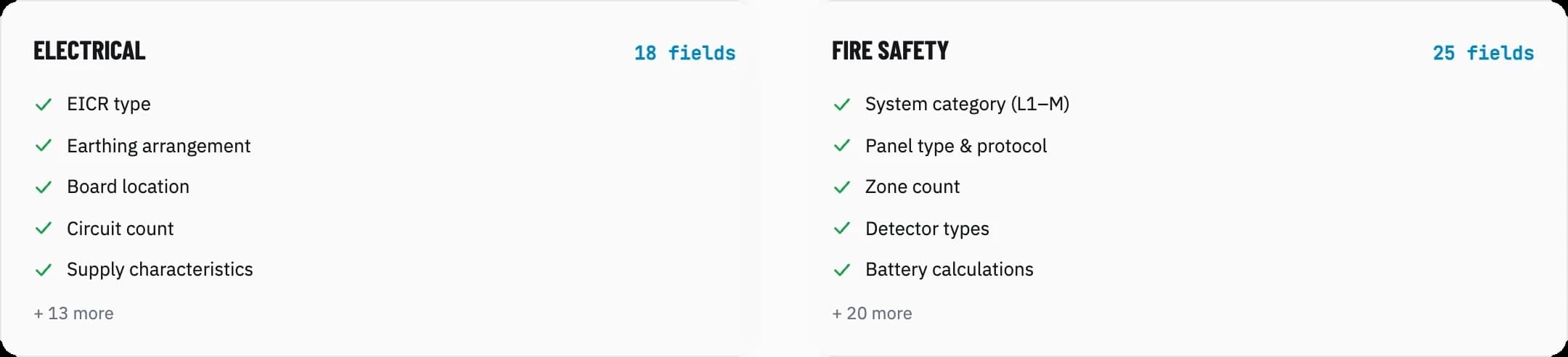
- Trade-specific fields capture compliance data for electrical, fire safety, and security jobs
- Multi-engineer assignment tracks team collaboration
- Actual duration vs. estimated helps quote future jobs accurately
- Parts tracking shows true job profitability
- Certificate auto-generation speeds invoicing
One Job, Three Views, Zero Re-Entry.
The step-2 wizard, the job card, and the day planner all read the same record — job type, priority, engineers, and time slot flow straight through.
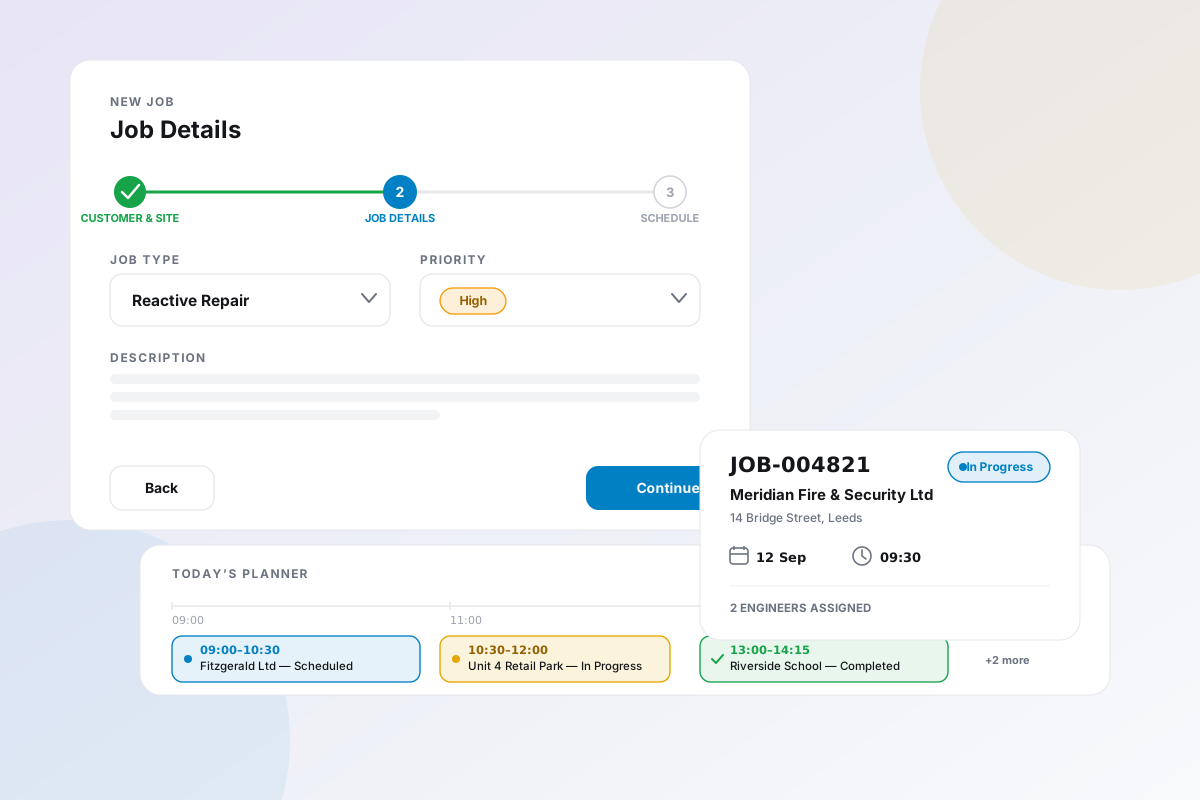
A Job Created in Under Two Minutes.
Customer & site, job details, schedule. Pre-filled from the customer record, so there is nothing to retype.

Two-Person Jobs, No Coordination Confusion.
Assign as many engineers as the job needs, designate the primary contact, and everyone can see who else is on it.

Forms That Know Your Trade.
Electrical, fire safety, and security jobs each get the trade-specific fields you need. No generic forms, no workarounds.
Check Out, and the Paperwork Writes Itself.
Duration rounds to the nearest 15 minutes. Completion triggers the certificate — pre-filled from the job.

What it does
Opscel vs. the rest
| Feature | Opscel | Others |
|---|---|---|
| Industry-specific fields (Electrical, Fire Safety) | ✓ | No |
| Multi-engineer assignment with primary designation | ✓ | Some |
| Multi-visit tracking per job | ✓ | No |
| Parts used tracking from product catalog | ✓ | Some |
| Auto duration calculation (rounded to 15 min) | ✓ | No |
| Work summary visible during job progress | ✓ | No |
| Certificate auto-generation on completion | ✓ | No |
| Job types with PDF template mapping | ✓ | Some |
Opscel Jobs Module — common questions
Ready to transform your operations?
30-day free trial. Full access from day one.