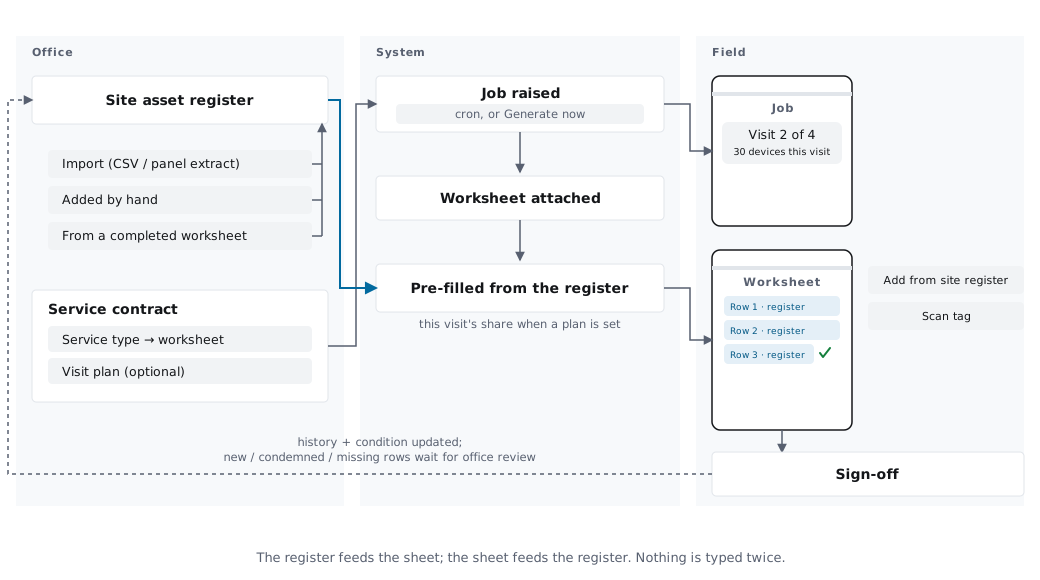
When your engineer fills out a worksheet on site — a Fire Extinguisher Service, a Fire Alarm Commissioning, an EV Charger Install — they're already listing the equipment they touched. OpsCel turns that list into tracked assets at the site, automatically. Reach the site again next year? The full service history is right there.
Availability
Asset tracking is included on the Business plan (£79/month). Starter and Team plans don't include the asset module, the per-site register PDFs, or the worksheet-to-assets bridge.
Recommended for established teams. When this is on, completing a worksheet immediately creates assets. When off (the default), an admin reviews first.
Steps
- 1.Go to Settings → Asset Tracking
- 2.Toggle "Auto-register on worksheet completion"
- 3.Hit Save Changes
That's it. The next worksheet your engineer marks Complete will register its items as assets.
Use this when you want to review the items before they become permanent records.
Steps
- 1.Open the job
- 2.Click the Assets tab
- 3.You'll see a banner at the top: "5 fire extinguisher items extracted from worksheet"
- 4.Click Register 5 items
- 5.Confirm. The assets appear in the Assets list immediately.
Multiple types
If the worksheet has multiple types in one go (e.g. a fire alarm commissioning sheet with panels and detectors), the banner shows the breakdown: "3 fire alarm panels + 12 smoke detectors extracted from worksheet".
The per-site register your insurer/client expects to see — laid out like the paper version they've used for years.
Steps
- 1.Go to Customers → [Customer] → [Site]
- 2.Click the Assets sub-page
- 3.Click Print Register in the header
- 4.The PDF opens in a new tab — print or save as needed.
What the register shows
Site address, contact, "Month Due", every asset's number/type/size/position, and a multi-year service history grid with the engineer's initials on every visit.
Steps
- 1.Go to Customers → [Customer] → [Site] → Assets
- 2.Click Add Asset
- 3.Pick the asset type, fill in the location, save.
The new asset takes the next number in the per-site sequence.
Steps
- 1.Open the asset (from the Assets list, the site page, or the job's Assets tab)
- 2.The Service History section lists every job that touched it, with the work performed and the engineer who did it.
Each visit shows the action (serviced, inspected, repaired, replaced, decommissioned), any deficiencies found, and the date/initials.
The FAC worksheet's device list creates panels AND their detectors in one go. Order matters: enter the panel first, then the devices that connect to it.
Steps
- 1.Open the FAC worksheet
- 2.Scroll to Device list (commissioned at this visit)
- 3.Row 1 — pick Fire Alarm Panel, fill the location. Leave "Parent panel #" blank.
- 4.Row 2 onwards — pick the detector / sounder / call point, and set Parent panel # to 1 (the row number of the panel it connects to).
- 5.If the site has more than one panel, repeat — the second panel might be Row 8, then its detectors set Parent panel # = 8.
When you Mark Complete (or an admin clicks Register), the detectors automatically link to their panel.
Steps
- 1.Open the asset
- 2.Change Status to Decommissioned
- 3.Save.
The asset stays on the register (with its history) but no longer shows in active counts. If it was a fire alarm panel, its detectors keep their records — they're not deleted with the panel.
Already registered some items but added more rows to the worksheet? No problem.
Steps
- 1.Open the job → Assets tab
- 2.The banner shows the new pending count (already-registered items don't get duplicated)
- 3.Click Register N pending items
Re-running is always safe. Already-registered rows are skipped automatically.
What is an "asset" in OpsCel?
A physical piece of equipment installed at a customer site that needs servicing on a recurring basis — fire extinguishers, smoke detectors, fire alarm panels, emergency lights, distribution boards, EV chargers, solar inverters, and so on.
What tier do I need?
Asset Management is on the Business plan (£79/month). Starter and Team plans don't include the asset module, the per-site register PDFs, or the worksheet-to-assets bridge.
Do my engineers need to do anything different?
No. They fill the same worksheet they were already filling — the Fire Extinguisher Service Worksheet, the Fire Alarm Commissioning Worksheet, etc. The bit that becomes assets is the items list they were already entering.
What worksheets can produce assets?
Today: Fire Extinguisher Service and Fire Alarm Commissioning. More are landing as we add them — get in touch if your trade isn't covered.
How do existing assets get into OpsCel?
Three ways: (1) bulk CSV import from Settings → Data Management, (2) added by hand on the site's Assets page, or (3) auto-created when an engineer fills the relevant worksheet.
What happens if my engineer enters the same item twice?
The worksheet → assets bridge is idempotent — running the same worksheet twice doesn't create duplicates. Already-registered rows are skipped automatically.
My fire alarm panel got deleted — what happened to the detectors?
The detectors stay (with their full service history). They're "orphaned" — no longer attached to a panel. You can re-parent them by editing the detector and picking a different panel, or accept them as standalone records.
Can engineers register assets, or only admins?
Admins register assets by default. Engineers fill the worksheets — that's the data — but the act of committing items as permanent asset records is admin-only. If you trust your engineers' input, switch on auto-register (Settings → Asset Tracking) and the step happens automatically when they Mark Complete.
What format is the Asset Register PDF?
Modelled on the paper formats your customers and assessors are used to seeing — Synergy/Balthorne for extinguishers (TYPE · SIZE · POSITION · D/E · ES Due plus the multi-year service grid), publisher-style logbook layout for fire alarm devices. We follow what BS 5306-3, BS 5839-1 and BS 5266-1 mandate be recorded; the visual layout matches the conventions your trade already prints.
My engineer's worksheet had 8 devices but only 5 became assets. Why?
The most likely cause is row order on the Fire Alarm Commissioning device list — child devices must list their parent panel first in the row order. The Assets tab will tell you exactly which rows were skipped and why ("Parent row 4 not yet promoted — parent rows must come before children"). Re-order the worksheet rows and re-run.
Can I reorder the assets in my register?
Not yet via the UI — assets number in the order they were added to a site. If you need a one-off re-number, contact support.
Will my data ever leak between customers / businesses?
No. Every query in the asset module filters by your business ID. Even if an engineer types another tenant's asset number into a worksheet by mistake, the system silently ignores it (recorded as "unresolved reference") rather than touching the other tenant's data.
What about the engineer's initials on the register?
Drawn live from the engineer's name on their OpsCel account. If an engineer leaves and is removed from your team, their historical visits show "—" instead of initials — but the date and the work performed stay on record.
Can I customise the register columns or the PDF layout?
Not in the current release. Each asset type has a fixed column set tuned to the standard for that trade (BS 5306-3 columns for extinguishers, etc.). If your customer asks for a different layout, let us know — we add new register variants on demand.
How do I report a problem?
Email support with the job number and the worksheet name. We can see the worksheet's underlying data and any skipped rows immediately.
Need More Help?
Email support with the job number and the worksheet name. We can see the worksheet's underlying data and any skipped rows immediately.
Contact Support