All Features
Defects & Remedial Quotes

Every Fault Found on Site Becomes Remedial Work You Can Quote

Your engineers find faults on every service visit: a detector head missing, a fire door that won't close, a cracked call point. Opscel makes each one a defect with a severity, photos and parts, puts it in front of the office on the job and the dashboard, and turns the ones you pick into one remedial quote. It stays on the site's defect register until it's resolved. And if a defect is logged on the wrong job, it can be deleted safely, with a confirm step and photos you can get back.

4 severities
Observation, Minor, Major, Critical: from advisory only to immediate action
1 quote
Tick the defects to include and create one bundled remedial quote
30 days
To restore photos deleted with a defect raised by mistake
Process

How it works

1
The Engineer Logs the Defect
On the Defects screen in the field app: severity, description, location and photos. Major, Critical and quote-required defects get a Parts section, and a draft Remedial Scope of Works sheet is attached to the job.
2
The Office Sees It on the Job
The job's Defects card shows every open defect with its severity, location, parts, photos and quote status. Office users can add or edit defects here on any job, including a completed one.
3
Bundle the Defects Into One Quote
Press Create Bundled Quote on the job and tick the defects to include, or press Quote on the dashboard's Jobs Pending Remedial Quotes widget. Opscel creates one quote with lines for each defect, ready for you to check, price and send.
4
Remedial Job, Then Resolved
The accepted quote becomes the remedial job. Once the fault is fixed, the engineer or the office marks it resolved, and it stays on the site's defect register as history.
5
Logged on the Wrong Job? Delete It Safely
Edit the defect and choose Delete defect. You confirm first, you can choose to delete its photos too (they can be restored for 30 days), and the delete is recorded in the audit log. Then add it to the right job.
Benefits

Who it's for

Fire Safety Contractors
  • Missing detector heads, failed door closers and cracked call points found on a service visit become defects the office can quote, not notes on a job sheet
  • Severity wording (advisory only, next routine visit, within 28 days, immediate action) that makes the urgency clear
  • The site's defect register shows what's still outstanding before the next visit
Electrical Contractors
  • Faults found on a job are logged with photos and parts, so remedial work is priced from what the engineer actually saw
  • One bundled quote for several defects instead of a quote per fault
  • The office can add a defect to a completed job when a finding turns up later
Office & Operations
  • A dashboard widget lists the jobs whose defects still need quoting
  • Fix a defect logged on the wrong job without deleting anything that's already on a quote or resolved
  • Every delete leaves a full copy in the audit log
Phone to Office

Logged on the Phone. Seen in the Office.

The engineer picks a severity, adds photos and, for bigger jobs, the parts it will need. The same defect shows up on the job's Defects card in the office, ready to quote.

  • Four severities your team already thinks in: Observation, Minor, Major, Critical
  • Photos from the camera or the gallery, attached to the defect
  • Office users can add or edit a defect on any job, even a completed one
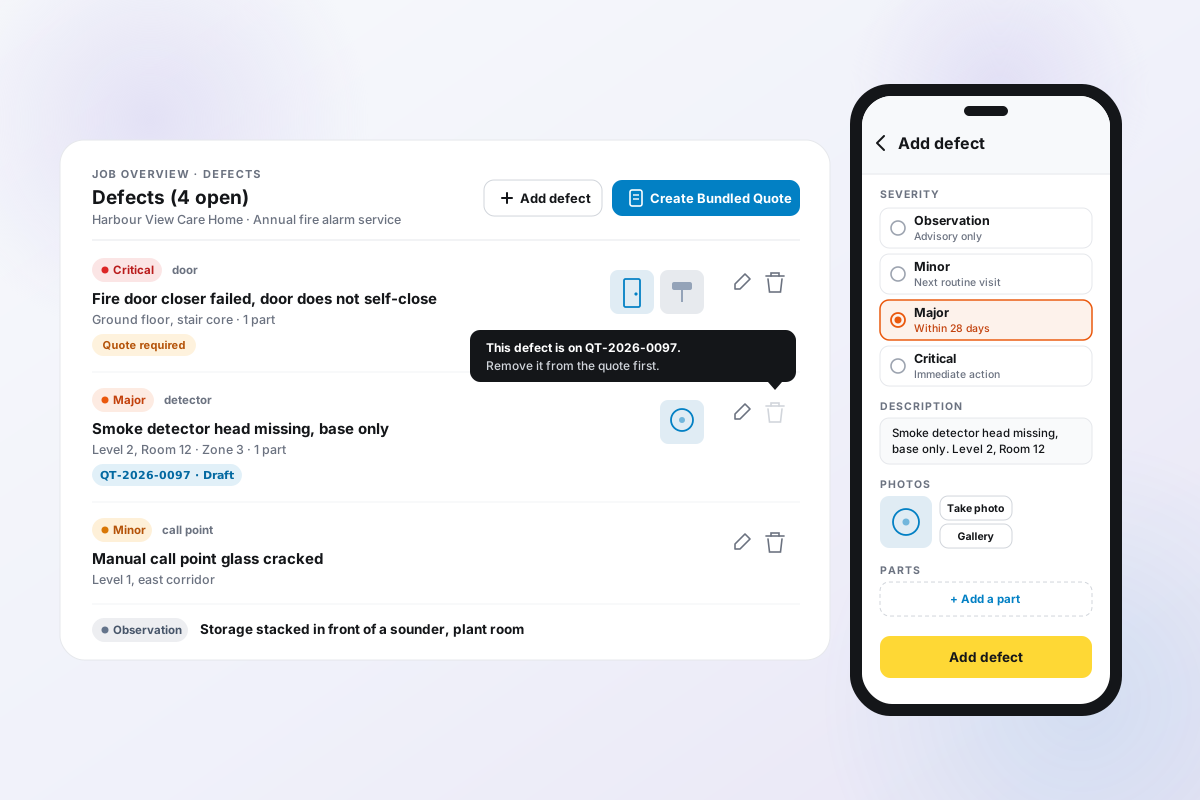
The office job page Defects card listing a Critical fire door defect marked Quote required, a Major smoke detector defect already on draft quote QT-2026-0097 with its delete icon greyed out, a Minor call point defect and an Observation, beside a phone showing the engineer's Add defect form with Major selected, a photo, and an Add a part button.
The Loop

Defect, Quote, Remedial Job, Resolved.

A Major or Critical defect, or one marked Quote required, attaches a draft Remedial Scope of Works sheet for the pricing detail. The office bundles the defects into one quote, the accepted quote becomes the remedial job, and once the fault is fixed the engineer or the office marks it resolved, so it stays on the site's register as history.
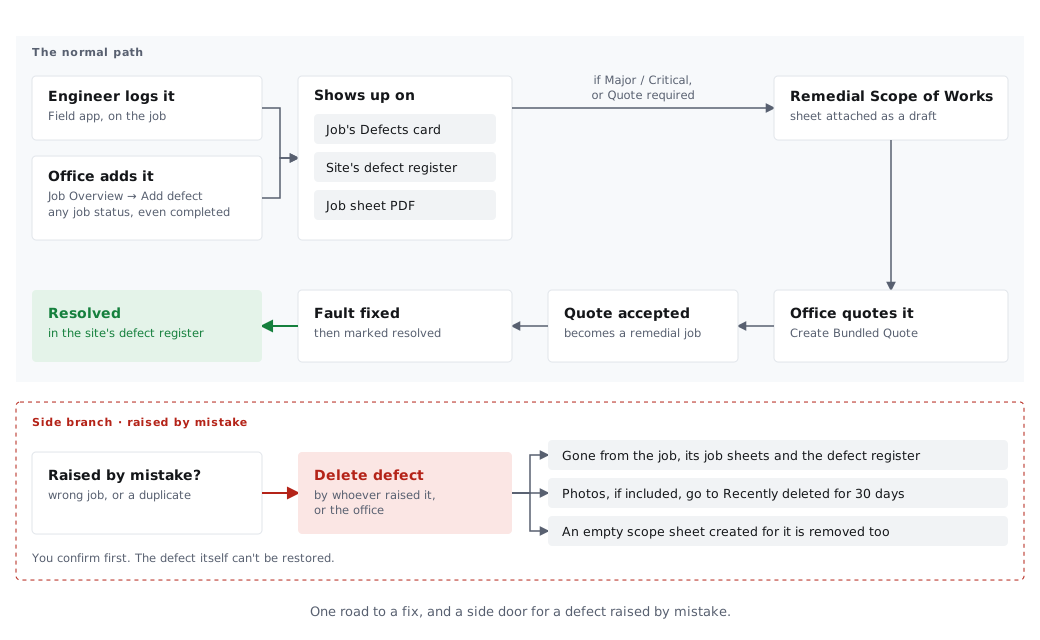
Flow diagram of a defect: an engineer logs it in the field app or the office adds it from the job Overview; it shows on the job's Defects card, the site's defect register and the job sheet PDF; a Major, Critical or quote-required defect attaches a draft Remedial Scope of Works sheet; the office quotes it with Create Bundled Quote; the accepted quote becomes a remedial job; the fault is fixed and the defect is marked resolved in the site's defect register. A side branch shows a defect raised by mistake being deleted by whoever raised it or the office.
Fix Mistakes Safely

Undo a Mistake. Never Rewrite History.

Logged on the wrong job, or twice? The person who raised it, or the office, can delete it after a confirm step. Once a defect is on a quote or resolved, it can't be deleted, so the record behind a quote or the site's history can't quietly disappear.

  • Photos deleted with a defect can be restored from the job's Photos for 30 days
  • Engineers can't delete a colleague's defect
  • Every delete is recorded in the audit log with a full copy of the defect
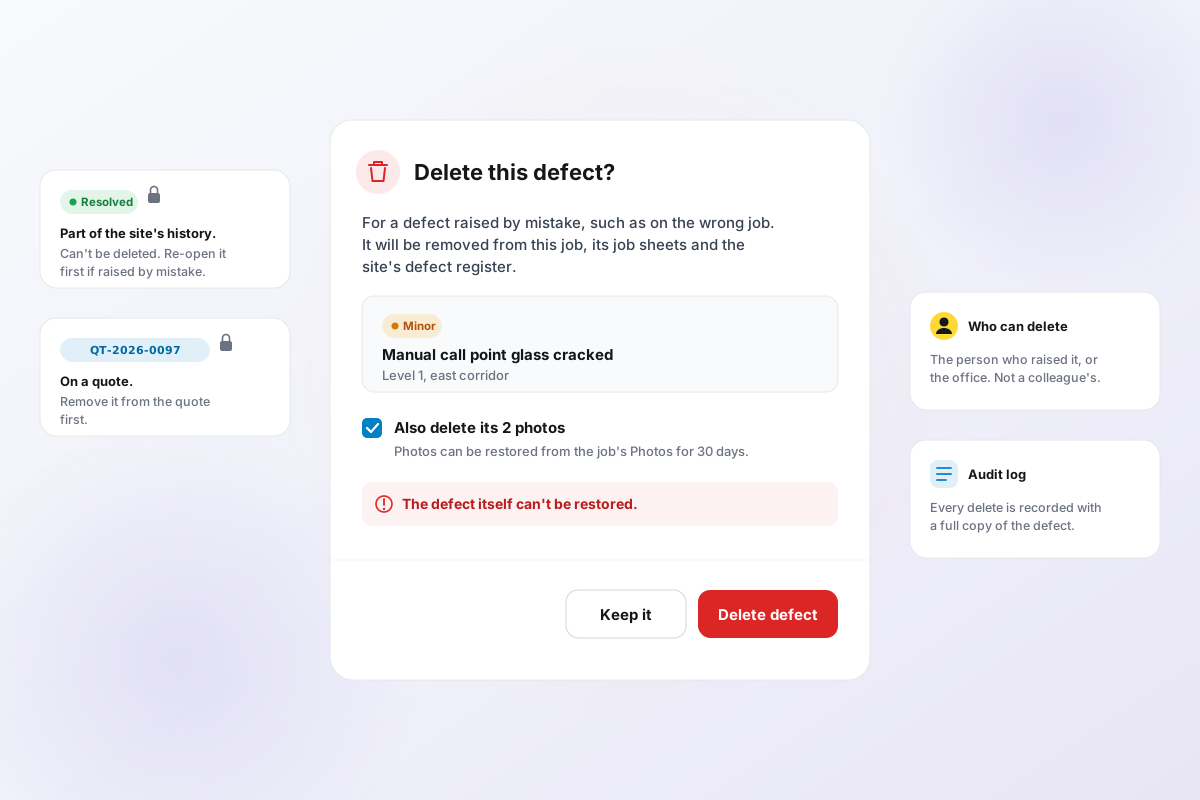
The Delete this defect? dialog showing a Minor call point defect, a ticked Also delete its 2 photos option noting photos can be restored from the job's Photos for 30 days, a warning that the defect itself can't be restored, and Keep it and Delete defect buttons. Side notes say resolved defects are part of the site's history, a defect on a quote must be removed from the quote first, only the person who raised it or the office can delete it, and every delete is recorded in the audit log.
Capabilities

What it does

Log It Where You Find It
Engineers log defects from the Defects screen in the field app, on the job they're on. Severity, description, location and photos in one form. No signal in the plant room? Changes wait on the phone and sync when the connection is back.
Severity With a Deadline Attached
Observation (advisory only), Minor (next routine visit), Major (within 28 days), Critical (immediate action). The same wording on the phone and in the office.
Photos and Parts
Take a photo or pick one from the gallery. For Major, Critical or quote-required defects, a Parts section lets the engineer add parts from your catalogue.
One Bundled Remedial Quote
Create Bundled Quote lets you tick which defects to include, with quote-required, Major and Critical ones pre-ticked. Each defect gets a heading line, priced part lines from your catalogue and a labour line.
Remedial Scope of Works Sheet
A Major, Critical or quote-required defect attaches a draft Remedial Scope of Works sheet, so the hours, engineers and parts behind the quote are written down on the job.
The Site Register Remembers
Defects sit on the site's defect register (the Deficiency Register on the site page) as well as the job, so the next visit can see what's still outstanding, and resolved defects stay as the site's history.
A Dashboard Queue for Quoting
The Jobs Pending Remedial Quotes widget lists the jobs with defects still to quote. Press Quote, confirm, and one quote is created for that job's defects.
Delete With Guardrails
A defect raised by mistake can be deleted by the person who raised it or the office. A defect on a quote can't be deleted and the app says which quote; a resolved one offers Re-open instead.
An Audit Copy of Every Delete
Every deleted defect is recorded in the audit log with a full copy of what it said, so a removal is never silent.
FAQ

Defects & Remedial Quotes — common questions

Ready to transform your operations?

30-day free trial. Full access from day one.