Purchase Orders Built From the Job You've Already Priced
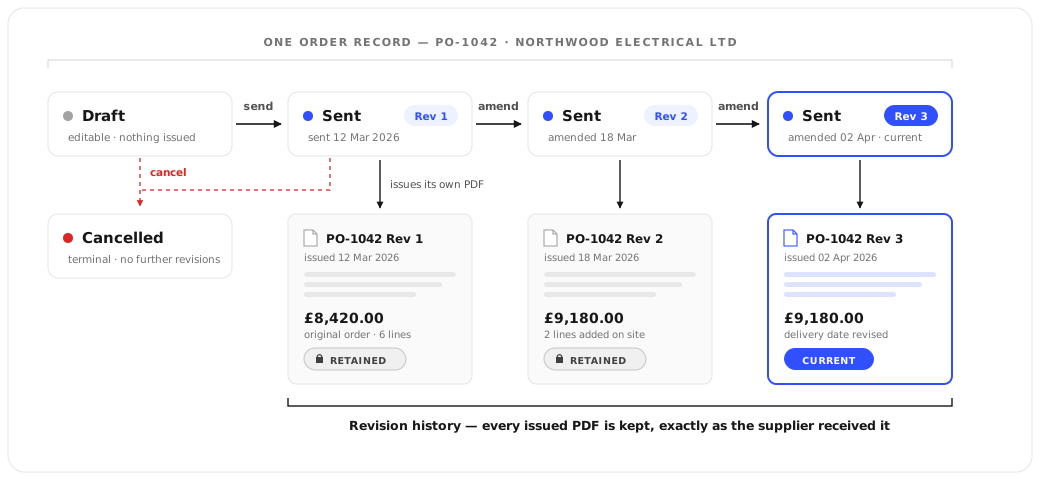
Raise a purchase order from a job or from a quote's materials take-off, and the order codes, quantities and buy costs land on it automatically — no retyping a parts list you've already priced. Send it to your supplier or subcontractor, and if the order changes afterwards, amend it: the supplier gets Revision 2, and the original stays exactly as it was sent, with its own PDF.
How it works
Who it's for
- Raise a PO from a job in seconds — site address and job link already on it
- Pull a quote's materials take-off straight onto an order — no retyping a parts list you already priced
- Amend a sent order without a phone call — it becomes Revision 2 and the supplier is re-emailed automatically
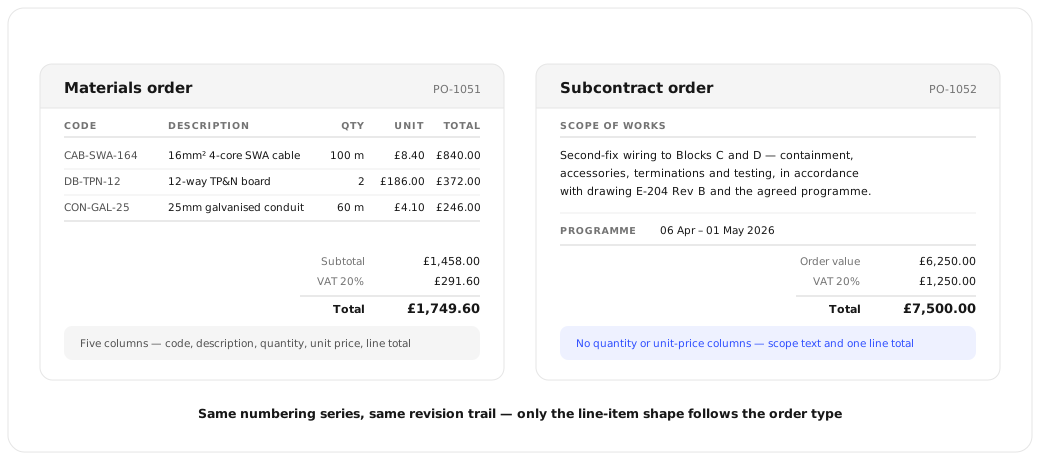
- Materials and Subcontract orders print the right layout for the job — quantities for parts, scope and price for labour
- Instruct subcontract work with a proper Subcontractor Purchase Order — scope, price, required-by date
- Every revision is kept with its own PDF, so a dispute over what was ordered is a two-click lookup, not a phone call
- Separate numbering prefix for subcontractor orders, if that's what your subbies already expect
- Full order history sits against the job it was raised from
- Buy prices are visible to Admin, Contract Manager and Accounts — not to Site Managers or field engineers
- Every PO carries a number the supplier is told to quote back on their invoice
- VAT and totals sit on the order the same way they'll sit on the supplier's invoice
- Revision history means the order you agreed and the order you're being invoiced against are never in doubt
Change a Sent Order. Keep What They Received.
Most systems lock a purchase order the moment it is emailed, so a change means a phone call and an argument about which version is real. Amend an order here and it becomes the next revision — the supplier is re-emailed, and every earlier PDF is kept exactly as it went out.
- The order number never changes — only the revision does
- Each revision keeps its own PDF, exactly as the supplier received it
- If they query what was ordered, you can still produce the document they hold
A Subcontract Order Should Not Look Like a Parts List
Materials orders carry codes, quantities and unit prices. Subcontract orders carry the scope and the price — and none of the quantity columns that mean nothing for a day of labour. Same numbering, same revision trail; only the line-item shape follows the order type.
What it does
Opscel vs. the rest
| Feature | Opscel | Others |
|---|---|---|
| Raise a PO from a job or a quote's take-off | ✓ | Some |
| Amend a sent order without losing the original | ✓ | No |
| Every revision kept with its own PDF | ✓ | No |
| Materials and Subcontract order types | ✓ | Some |
| Separate numbering prefix for subcontractor orders | ✓ | No |
| Buy prices hidden from field roles | ✓ | Some |
Opscel Purchase Orders — common questions
Ready to transform your operations?
30-day free trial. Full access from day one.